Case study
Reducing Cloud Costs Without Breaking Production
Reducing cloud spend without hurting production is not a finance exercise. It is a production engineering task.
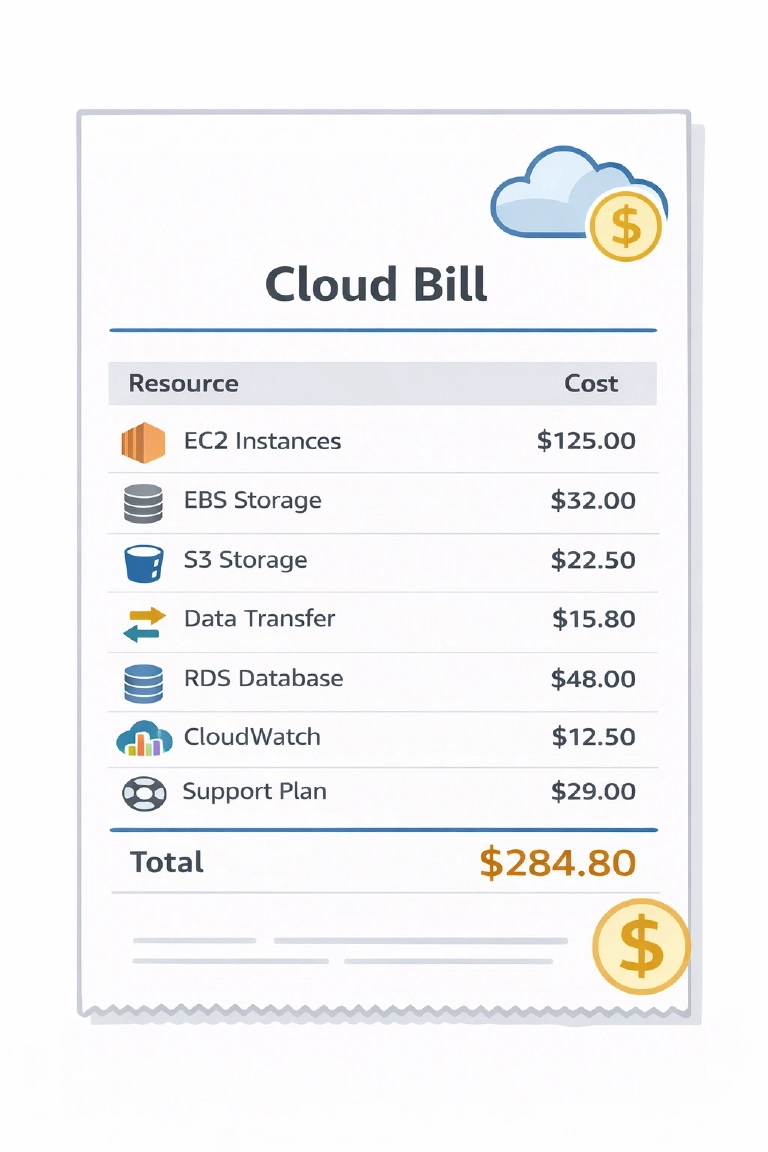
The goal is not to make the bill smaller for one week. The goal is to lower spend while keeping latency, error rates, recovery margin, and operational clarity under control. That requires a methodical approach. Blind cuts are how teams create expensive incidents, noisy rollbacks, and hidden performance regressions.
In real projects, the safest sequence is usually the same:
- Get cost detailization.
- Identify the scopes worth working on.
- Audit selected resources and workloads.
- Do low-risk cleanup first.
- Measure the effect.
- Only then go into deeper optimization.
That order matters.
Why blind cost cuts are dangerous
Cloud bills are tightly coupled to system behavior. Cutting spend blindly often shifts the cost somewhere else.
A smaller database instance may reduce the invoice line for compute, but increase I/O wait, query time, retries, lock contention, and CPU burn in application workers.
Lower Kubernetes requests may reduce apparent capacity waste, but if done without workload analysis, it can also increase scheduling pressure, evictions, throttling, and tail latency. Pods that are permanently recreated on CGroup-OOM due to insufficient requests will consume way more resources.
Aggressively cutting logs and traces may save money this month, but it can also remove the evidence you need during the next incident.
The problem is simple: cloud resources are part of the runtime behavior of the system. They are not separate from production. Treating cost reduction as a set of isolated billing actions is a common mistake.
Start with cost detailization, not with resizing
Before changing anything, break the bill down into something engineers can actually reason about.
At minimum, detailize costs by:
- environment: production, staging, development
- service or product area
- compute, storage, network, managed services, observability
- critical vs non-critical workloads
- steady load vs burst-driven load
- direct vs indirect costs
That last point is important. Some costs are obvious, such as instance hours, disk space, snapshots, log ingestion, or network egress. Others are indirect and often larger over time.
A database full of stale sessions, obsolete indexes, log tables, old notifications, popup history, or expired message data does not only cost disk space. It also increases tablespace size, backup time, restore time, query cost, cache churn, compaction or vacuum overhead, and CPU time needed to serve normal traffic. Garbage collection failures are often both a data hygiene problem and a cloud cost problem.
Do not optimize “the cloud bill” as one number. Optimize cost domains that correspond to real system boundaries and applications that are running in that cloud. Cloud cost management is a shared responsibility - app developer, devops, or web designer - cost optimization should be considered at every level. And it is not a one-time fix but a continuous process that requires clear visualization (thanks to Grafana, it should be simple), regular reviews, automation, and strategic alignment.
Five graphs to keep open while reducing costs
When making cost changes, five signals should stay visible at all times:
- Traffic volume, so cost changes can be compared against real demand.
- Latency, especially p95 and p99, not just averages.
- Error and retry rate, including timeouts and upstream failures.
- Saturation signals, such as CPU throttling, memory pressure, disk I/O wait, queue backlog, and connection pool pressure.
- Spend by service or workload, so savings can be tied to a specific change.
Without these graphs, teams often declare success too early. The bill goes down, but latency slowly rises, retries increase, or a queue starts accumulating until the next traffic spike turns it into an incident.
Low-risk cleanup first
The first cost savings should come from waste removal, not from aggressive resizing.
This phase is usually the safest because it removes things that should not exist in the first place, or reduces retention where the business value is clearly low.
Typical low-risk cleanup includes:
- deleting unused volumes, snapshots, IPs, load balancers, and old machine images
- cleaning stale data, stale sessions, temporary records, old notifications, message tables, and abandoned indexes
- enforcing retention and rotation for logs, events, and operational tables
- reducing unnecessary logging and tracing volume
- rightsizing non-critical services first
- parking or shrinking staging and development workloads that do not need production-like capacity all day
This stage often produces immediate savings with limited operational risk.
It is also where many teams discover that the cloud bill has been inflated by neglect rather than by actual demand. Data that nobody reads, indexes that nobody needs, and logs that nobody uses are very expensive habits.
Preemptible and spot instances
Another practical cost lever is preemptible or spot capacity.
Spot instances (also called preemptible VMs in some platforms) can reduce costs significantly compared to on-demand instances. In practice, they are usually the first place to look when a workload is interruptible by design.
The safe rule is simple: use spot capacity only where interruption is expected, tolerated, and operationally clean.
Good initial candidates include:
- batch jobs
- CI/CD runners and build agents
- data pipelines
- background workers with retry support
- stateless queue consumers that can restart cleanly
These workloads are usually easier to move first because they do not require strict continuity on a specific node. If an instance disappears, the job can be retried, rescheduled, or picked up by another worker.
This is where many teams get early savings without touching customer-facing production paths.
That said, spot usage is not “free money”. It only works well when the workload is designed for interruption. Before moving anything to spot capacity, verify:
- jobs are idempotent or at least safe to retry
- interruption does not corrupt state or produce duplicate side effects
- queues, checkpoints, or intermediate outputs can survive worker loss
- startup time is acceptable
- autoscaling and rescheduling behavior are well understood
In Kubernetes environments, spot nodes can be very effective for tolerant workloads, but they need proper separation from critical services. Use taints, tolerations, node affinity, and priority classes so that customer-facing workloads are not accidentally scheduled onto volatile capacity.
A practical rollout path is:
- start with CI/CD agents, batch processing, and non-critical async workers
- measure interruption frequency and recovery behavior
- verify that savings are real after retries, longer runtimes, and operational overhead
- only then expand usage to broader classes of interruptible workloads
Spot capacity is one of the best cost optimization tools available, but only when reliability is designed around the fact that the instance may disappear at any time.
Quick cut-offs are acceptable, but only as a temporary move
Sometimes the bill needs to go down quickly. That can justify temporary cut-offs, but they must be treated as temporary.
Examples:
- shorter retention for low-value logs
- lower trace sampling
- smaller non-critical node pools
- reduced capacity for internal tools
- pausing rarely used non-production workloads outside working hours or for weekends or long holidays
These actions are useful for immediate relief, but they are not a complete optimization strategy. They must be followed by measurement and review.
If a temporary cut survives only because nobody checked the graphs afterward, it stops being optimization and becomes silent risk accumulation.
Audit real workload shape before resizing anything important
After cleanup, the next step is workload audit.
The main question is not “what is provisioned?” but “how does the workload actually behave?”
Three patterns matter a lot:
Irregular load with spikes
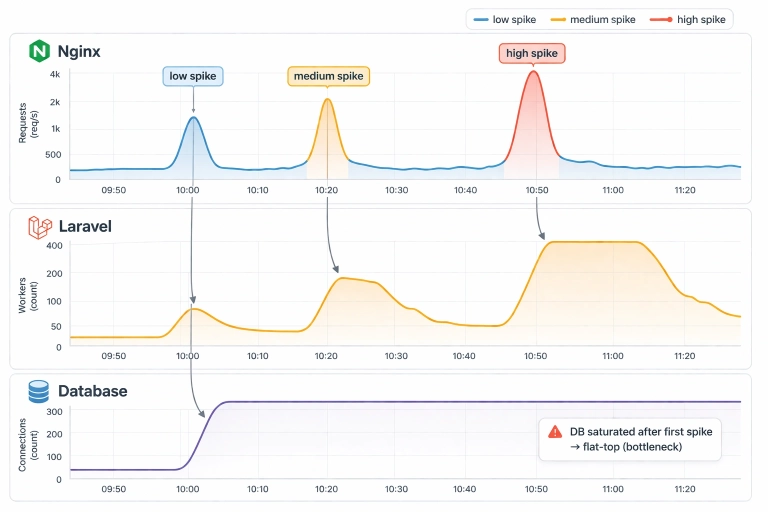
Some systems are mostly quiet and occasionally spike hard. This is where cloud elasticity can be valuable, assuming the scaling path is real and not theoretical.
If the database, message broker, cache, or upstream dependencies cannot scale with the application tier, then autoscaling compute alone does not solve the problem. It may just move the bottleneck.
Minimal load
Some workloads are simply too small to justify their cloud footprint. A tiny steady service can become expensive once managed networking, observability, backups, and storage overhead are added. In such cases, the cheapest architecture may be a much simpler one.
Predictable steady load
When demand is known, flat, and technically boring, pre-provisioned hardware can often do the job more cheaply and more predictably than pay-as-you-go infrastructure. This is especially true when the workload is dominated by databases, search, queues, or storage-heavy background processing.
Kubernetes: where cloud cost waste often hides
In Kubernetes environments, cost problems are often caused less by the cloud provider and more by cluster habits.
The first place to look is resource requests and limits.
Overstated requests inflate node count and waste capacity. Understated requests create contention, throttling, evictions, and unstable latency. Both are expensive in different ways.
A practical audit should look at:
- actual CPU and memory usage distributions, not just averages
- workloads with large request-to-usage gaps
- noisy neighbors on shared nodes
- whether HPA reacts to a useful signal or only to CPU
- whether Cluster Autoscaler is adding nodes because of real demand or bad requests
- DaemonSets and sidecars that quietly consume capacity on every node
- observability agents that collect more than anyone reviews
A cluster can look healthy while still being cost-inefficient. It is common to see too many nodes, too many replicas, excessive log volume, and oversized requests at the same time.
For Kubernetes specifically, cost optimization should be treated as a scheduling and workload-behavior problem, not only as an infrastructure problem.
Managed services are not always expensive, and not always cheap
A common mistake is assuming that managed services are either always worth it or always overpriced.
Both views are too simple.
Managed services can be very efficient when they replace a large amount of operational work, absorb bursty traffic well, or provide capabilities that would otherwise require a lot of engineering time. This is often true for functions, workers, queues, CDN, or certain operationally mature managed databases.
But when the workload is stable, predictable, and heavily utilized, the premium can become hard to justify. In those cases, paying for convenience forever may be more expensive than running a simpler dedicated setup.
The correct question is not “managed or self-hosted?” The correct question is “what are we paying for, and are we still using that advantage?”
Sometimes the best cloud cost optimization is leaving the cloud
It should be said directly: sometimes the best way to reduce cloud costs is to leave the cloud, or at least leave the current cloud.
That is not ideology. It is engineering economics.
Moving away can make sense when:
- the load is predictable
- the hardware profile is well understood
- performance for the same spend is consistently better on dedicated resources
- storage and network costs dominate the bill
- the workload is database-heavy, search-heavy, or otherwise steady-state
Moving away does not make sense when:
- the workload is mostly low but must absorb sharp spikes
- the total footprint is so small that on-prem would be overkill
- managed services are doing a lot of valuable work
- operational simplicity matters more than raw infrastructure efficiency
In practice, the right answer is often not “cloud” versus “on-prem.” It can be another region, another provider, fewer managed layers, or a mixed model where only the predictable heavy components move.
The goal is not to defend a platform choice. The goal is to get a more predictable bill and better performance for the same spend.
A practical order of work
A safe cloud cost reduction project usually looks like this:
1. Detailize the bill
Split spend into real technical domains. Find the big rocks first.
2. Identify scopes
Choose the services, clusters, databases, or storage domains that actually matter.
3. Audit the selected scopes
Look at demand shape, utilization, retention, scaling behavior, and operational necessity.
4. Do low-risk cleanup
Remove waste before tuning real production capacity.
5. Measure the effect
Compare against traffic, latency, errors, and saturation signals.
6. Go deeper only where the data supports it
Rightsize, redesign, move workloads, or switch platforms only after the easy waste is gone.
This sequence avoids one of the most common failure modes: optimizing a noisy, dirty system and mistaking garbage for demand.
What usually works best
Across real projects, the most reliable savings usually come from a combination of:
- retention cleanup
- removing unused resources
- cleaning stale operational data
- rightsizing non-critical services first
- reducing excessive logging and tracing
- fixing rotation for logs and message-like tables
- auditing Kubernetes requests, limits, and node pool strategy
- revisiting whether a given workload still belongs in its current cloud setup
These changes are not glamorous, but they are where practical savings usually come from.
Final point
Reducing cloud costs safely is not about cutting harder. It is about cutting in the correct order.
First remove waste. Then verify workload shape. Then optimize what is real. Then reconsider platform placement where economics clearly support it.
That is how you get a lower bill without paying for it later in incidents, degraded latency, or operational fragility.