Case study
Cloud to On-Prem Migration: More Control, Better TTFB, No IO Freezes
Use case
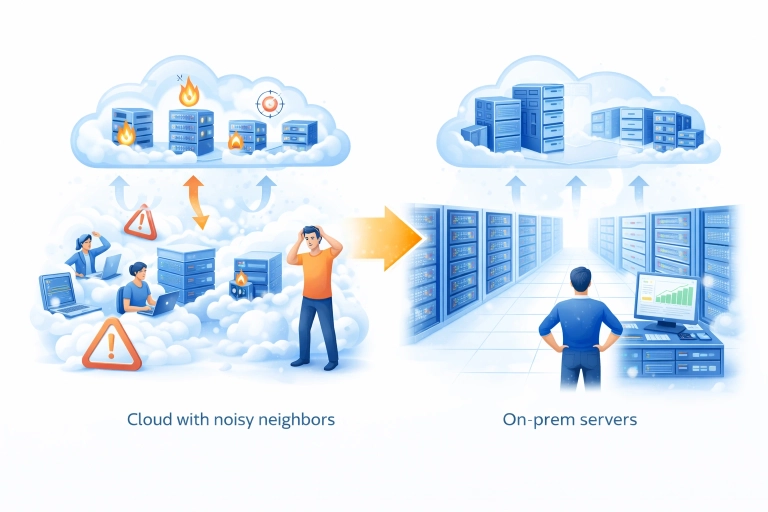
Cloud is not always the best long-term home for a stable, mid-load system.
In this case, the goal was not auto-scaling, multi-region reach, or rapid horizontal growth. The workload was steady, predictable, and already well understood. What mattered more was resource control, storage performance, and operational predictability.
The migration moved a production Laravel monolith and its supporting services from several cloud VPS instances to a dedicated on-prem server. The result was:
- no downtime during migration
- about 30% better TTFB
- page generation time reduced from ~800 ms to ~400 ms
- elimination of occasional but painful IO-related freezes
- full control over compute, storage, and virtualization
- about the same overall yearly cost
This article does not describe a universal rule. It describes a use case where moving from cloud VPS to a dedicated server was the more rational option.
Initial setup
The source environment was built on multiple cloud VDS/VPS instances from one provider in a single region.
The application stack included:
- Laravel monolith
- Elasticsearch 7.16.3
- MySQL 8.0 as the primary database
- PostgreSQL 15 present as part of an ongoing transition
- Memcached as the primary cache layer
- Redis present but not yet in active use
The workload was mid-load, with roughly 800 concurrent connections consistently present at the web tier. Because Memcached had a hit rate above 95%, most requests never reached the heavy path. That means raw concurrency alone would overstate backend pressure. In practice, the system had a stable traffic profile with a relatively small percentage of expensive requests reaching the database and search layer.
This is exactly the kind of profile where infrastructure predictability matters more than elasticity.
Why migrate away from cloud VPS
The trigger was not cost alone.
The main issues were:
- aging operating systems on the existing VPS nodes
- rare but real CPU steal problems
- occasional severe IO contention outside application control
The worst part was storage-level behavior under neighbor contention. During brief periods of elevated disk IO, the provider-side host could effectively stall the VPS. When that happened to the database node, the instance could become partially or fully unresponsive. The only practical recovery path was often a reboot.
This did not happen every week. It happened roughly once every two or three months. But each incident was painful and expensive in the wrong way:
- database-side instability
- 7 to 15 minutes of downtime
- no real ability to fix root cause from inside the VPS
- no guarantee it would not happen again
That is an important point. The issue was not average performance. The issue was loss of control over worst-case behavior.
For a stable revenue-generating system, that matters more than theoretical convenience.
Why on-prem made sense here
This migration was a good fit for on-prem because:
- the workload was stable
- autoscaling was not required
- the system already had a known steady-state footprint
- dedicated NVMe storage would remove the IO sharing problem entirely
- the total cost of a properly sized dedicated server was roughly the same as the combined VPS footprint
The new platform was a dedicated server with:
- Xeon Gold CPU
- 128 GB RAM
- 2 NVMe drives in RAID1
- power redundancy in the data center
- dual network connections
- S3 backups via Restic
Workloads were placed on libvirt/KVM, managed through Ansible roles.
This is not “cloud replacement” in a generic sense. It is a shift toward:
- stronger storage guarantees
- better host-level control
- simpler resource planning
- lower exposure to noisy-neighbor behavior
Migration design
  flowchart LR
    subgraph SRC["Source environment"]
        WEB["Web / app data"]
        DB["PostgreSQL 15"]
        MDB["MySQL 8.0"]
        ES["Elasticsearch"]
    end

    subgraph PHASE1["Phase 1: file sync"]
        RSYNC1["rsync 1st pass"]
    end

    subgraph PHASE2["Phase 2: database migration"]
        MDUMP["mysqldump"]
        DUMP[pgdump_all]
        MRESTORE["mysql restore"]
        RESTORE["psql"]
    end

    subgraph PHASE3["Phase 3: search migration"]
        SNAP["snapshot"]
        SNAPREST["snapshot restore"]
    end

    subgraph DST["Destination environment"]
        WEBNEW["Site data, code, static assets"]
        MDBNEW["MySQL 8.0"]
        DBNEW["PostgreSQL 15"]
        ESNEW["Elasticsearch"]
    end

    subgraph PHASE4["Phase 4: file re-sync"]
        RSYNC2["rsync 2st pass"]
    end

    WEB --> RSYNC1 --> WEBNEW
    DB --> DUMP --> RESTORE --> DBNEW
    MDB --> MDUMP --> MRESTORE --> MDBNEW
    ES --> SNAP --> SNAPREST --> ESNEW
    RSYNC2 --> WEBNEW

    CUT{"Traffic cut-off"}

    PHASE1 --> PHASE2 --> CUT --> PHASE3
    CUT --> PHASE4
The migration was designed for zero downtime.
Data movement was split by workload type:
- site data, code, and static assets via
rsyncin two passes - MySQL and PostgreSQL via
mysqldump/pg_dumpand restore - Elasticsearch via snapshot and restore
This is a conservative approach, but for this use case it was appropriate. The goal was not fancy replication topology. The goal was controlled state transfer with predictable cutover.
Why two-pass rsync
For application files and static content, two-pass rsync reduces the delta on final sync:
- first pass transfers the bulk of data in advance
- second pass captures the final changes near cutover
That keeps the final transition smaller and more predictable.
Why dump/restore for databases
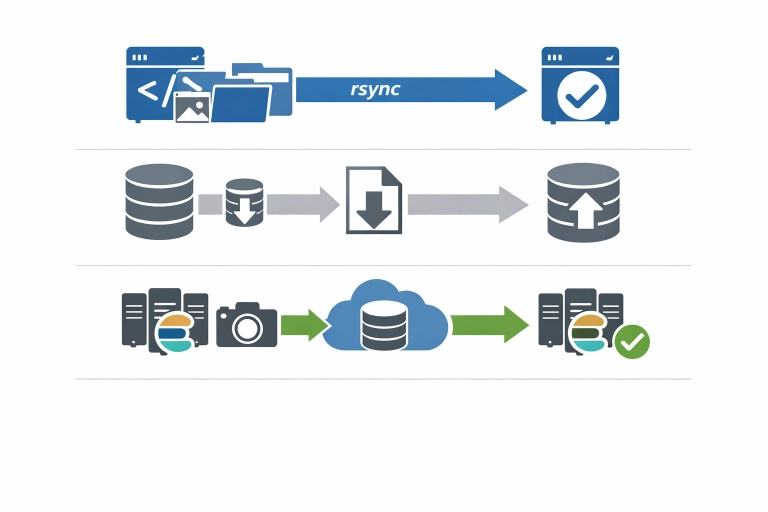
For this migration, dump and restore provided a simple and auditable path:
- explicit transfer boundaries
- straightforward validation
- no extra replication complexity during the move
This works well when the migration plan is controlled and the operational window is carefully prepared.
Why snapshots for Elasticsearch
Snapshot and restore is the natural path for Elasticsearch migration when consistency, recoverability, and repeatability matter more than ad hoc copying.
It also aligns well with the broader goal of moving the system in a staged, controlled way.
New target architecture
The destination environment consolidated the system onto a dedicated host with virtualization.
That brought several practical advantages:
- clean separation of workloads through KVM/libvirt
- infrastructure managed with Ansible roles
- no shared storage contention with unknown neighbors
- simpler performance reasoning
- easier future lifecycle management
It also improved ownership boundaries. Instead of renting a set of abstract VPS slices with opaque host behavior, the infrastructure became directly understandable at the resource level:
- CPU is known
- RAM is known
- storage is known
- failure domains are clearer
- backup behavior is clearer
This kind of predictability is often undervalued until the first infrastructure incident that cannot be debugged from inside a VPS.
Results
The most visible improvement was storage-related stability.
On the dedicated NVMe-backed server, IO load is now effectively negligible for the workload. More importantly, there are no shared neighbors competing for the same physical disk subsystem. That removed the exact class of incident that previously caused painful downtime.
Measured improvements included:
- ~30% lower TTFB
- page generation time reduced from ~800 ms to ~400 ms
- effective elimination of provider-side IO blocking risk
- full resource control on the host
This is a useful reminder: performance gains do not always come from tuning application code. Sometimes they come from removing infrastructure-level unpredictability.
Why this worked financially
The migration was also helped by favorable server pricing. A seasonal annual-payment offer made it possible to get roughly 1.5x more raw server capacity for about the same price as the previous combined VPS setup.
That matters because cloud-to-on-prem discussions are often framed too simplistically:
- cloud = flexible
- on-prem = cheaper but rigid
In reality, the right comparison is not ideology. It is workload shape.
For a stable system with:
- predictable load
- no autoscaling requirement
- strong cache hit rate
- infrastructure-sensitive latency
- painful exposure to shared-tenant IO behavior
a dedicated server can be the better engineering and business decision.
When cloud is still the better choice
This is not an anti-cloud argument.
Cloud still makes more sense when you need:
- rapid scaling
- burst-heavy workloads
- short-lived environments
- frequent topology changes
- many managed services tightly integrated into architecture
None of those were primary requirements in this case.
The workload was steady. Capacity needs were known. The main need was to remove hidden instability and regain control.
What changed operationally
The biggest long-term gain was not just lower TTFB.
It was this:
the infrastructure is now understandable and controllable end-to-end.
That means:
- fewer unknowns under load
- better confidence in storage behavior
- less dependence on provider-side host scheduling quality
- more predictable planning for future changes
This is often the real value of migration. Not just movement. Not just hardware. Not just cost.
Control.
Practical lessons
A few lessons from this migration are broadly reusable.
1. Rare incidents still matter
An issue that appears once every two or three months can still justify a migration if it causes production downtime and cannot be fixed from your side.
2. Stable workloads do not automatically benefit from cloud
If demand is predictable and capacity is easy to model, the flexibility premium may not be worth paying.
3. Shared IO is a real risk factor
Average benchmarks can hide worst-case behavior. Shared storage contention is one of the hardest problems to reason about from inside a VPS.
4. Simpler migration paths are often better
rsync, dump/restore, and snapshot-based movement may look less glamorous than more elaborate replication strategies, but they are often easier to validate and recover.
5. Control is part of performance
Lower latency and better TTFB came not only from faster NVMe storage, but from removing infrastructure uncertainty.
Delivery time
The migration took a little over seven working days in total.
Breakdown
6 working days were spent on preparing and configuring the target server:
- host setup
- virtualization
- storage
- backup integration
- base system configuration
- migration readiness checks
The remaining time was used for two controlled switchovers:
- one group of sites migrated during the first night
- the second group migrated during another night
The cutover was intentionally split into two service groups to reduce risk and avoid moving everything in a single step.
This made rollback planning simpler and reduced the blast radius of any unexpected issue.
Deliverables
- Current-state infrastructure review
- Migration plan with service split and risk reduction approach
- Preparation of the target dedicated server
- Base virtualization setup with libvirt / KVM
- Ansible-managed host configuration
- Storage setup on RAID1 NVMe
- Backup integration with Restic and S3
- Transfer of code, static assets, and site data
- MySQL and PostgreSQL migration via dump and restore
- Elasticsearch migration via snapshot and restore
- Controlled cutover in two separate waves
- Post-migration validation and stabilization
Final takeaway
This migration was successful because it matched infrastructure to workload reality.
The move from multiple cloud VPS instances to a dedicated on-prem server delivered:
- better latency
- faster page generation
- removal of IO-related freezes
- zero downtime migration
- full control over host resources
- similar overall cost
That is the key point.
The best migration is not “to cloud” or “from cloud.”
The best migration is the one that puts the workload in the environment that actually fits it.
Related services
FAQ
Why move from cloud to on-prem if the cost is similar?
Because cost was only part of the problem. The more important issue was occasional provider-side IO behavior causing production instability. Similar cost with better control and better performance was the stronger option.
Was this a high-load system?
It was more accurate to call it mid-load with stable sustained traffic. Roughly 800 concurrent connections were present at the web tier, but cache efficiency was high, with Memcached hit rate above 95%.
Why not solve this by upgrading VPS instances?
That would not remove shared-neighbor risk or provider-side host contention. It might improve average performance, but not control over worst-case IO behavior.
Was downtime required?
No. The migration was completed without downtime using staged sync and controlled data migration methods.
When is cloud still the better option?
Cloud is usually the better fit when workloads are bursty, need autoscaling, or benefit strongly from managed platform services.